How To Use Auto-Claim For Your Flare Rewards

Claiming rewards on Flare is easy, but it's also easy to forget. Every reward epoch you have to connect your wallet, open the rewards page, and manually send a claim transaction. Miss a few and it becomes a chore. Auto-claim solves this: once enabled, your rewards are claimed for you automatically, epoch after epoch, and land straight in your own wallet.
This guide explains what auto-claim is, how it works under the hood using Flare's executor system, and how to turn it on in the AU app.
What Is Auto-Claim?
Auto-claim is a feature that automatically claims your Flare rewards each reward epoch without you having to do anything. Instead of manually pressing "Claim" every epoch, you authorize a service to do it on your behalf.
On the AU app you can earn a few different types of rewards:
- FTSO Rewards - earned from delegating your vote power (WFLR) to FTSO providers.
- Staking Rewards - earned from staking to validators on the P-chain.
- rFLR Rewards - incentive rewards from participating Flare projects.
Auto-claim is available for your FTSO delegation rewards and your staking (validator) rewards. When it's on, you'll see an "Auto-claim on" badge next to that reward; when it's off, you'll see an "Enable auto-claim" button instead.
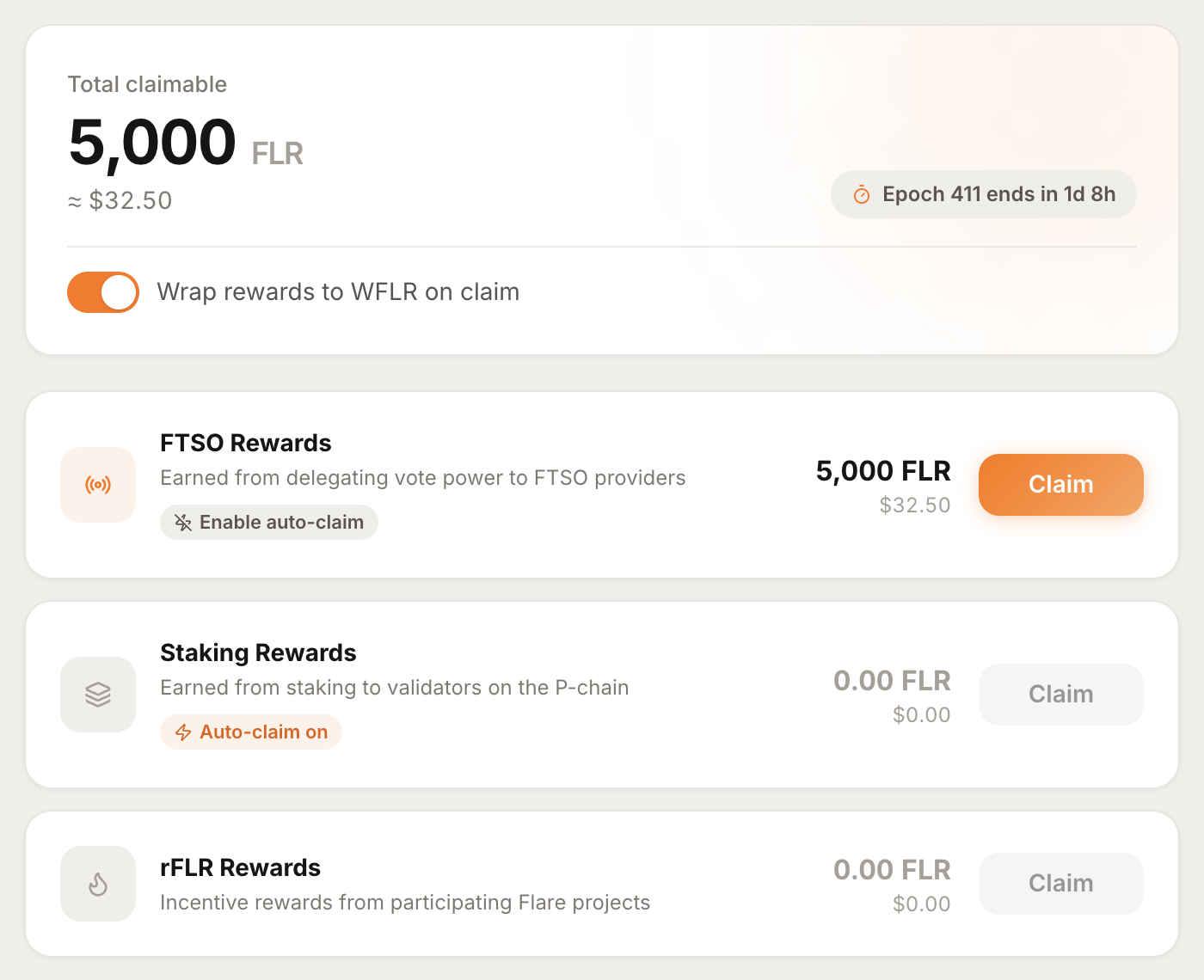 The rewards screen. Staking rewards already have auto-claim on, while FTSO rewards still show the "Enable auto-claim" option.
Importantly, auto-claim is non-custodial. Your rewards are always claimed directly to your own wallet - the service doing the claiming never takes custody of your funds and cannot move them anywhere else. To understand why, we need to talk about executors.
What Are Executors?
Flare's reward contracts include a built-in feature that lets an account owner authorize other addresses - called executors - to claim rewards on their behalf. This is a native protocol feature, not something layered on top by a third party.
There are two separate registries that manage executors, one for each reward type:
ClaimSetupManagerhandles executors for FTSO delegation and staking rewards.ValidatorRewardManagerhandles executors for validator rewards.
The key thing to understand is the scope of what an executor can do. An executor is only permitted to trigger a reward claim. It cannot transfer your tokens, change your delegation, unstake, or perform any other transaction. When an executor claims your rewards, those rewards go to your address, not the executor's. This is exactly what the app tells you when you enable it:
Authorize AU to claim your FTSO delegation rewards automatically each epoch. We are only authorised to claim rewards, no other transaction can occur.
So an executor is best thought of as a limited, single-purpose permission: "you may press the claim button for me, and nothing else."
What AU Is Doing: Running Executors For You
Authorizing an executor address is only half the story - something still has to actually be that executor, watch for new rewards each epoch, and submit the claim transactions (and pay the gas to do so). That's the service AU provides.
AU operates its own executor infrastructure: a pair of executor addresses that continuously monitor the network and claim rewards for every account that has authorized them.
0x3207b0dcC4f9a691B05271DBDD44D00566A27118
0x4A646692Dd27d8798c5CdfFf63f7181A723196E6
Both of these executors are operated by AU and both are required for full auto-claim functionality. When you enable auto-claim, the app registers these two AU executors on the relevant contract for your account. From then on, AU's bots do the work:
- They watch each reward epoch for claimable rewards on your account.
- Once your accrued rewards reach a minimum of 50 FLR, they submit the claim.
- The rewards are delivered directly to your wallet.
Because the claim goes straight to you and executors can't do anything except claim, you keep full control of your funds at all times.
The Fee - And AU's Free Executor
Running executors costs money: the bots pay gas on every claim, every epoch, for every account. To cover this, there's a small fee:
- 4 FLR for registration and per claim.
However, AU offers a free executor for its larger supporters. You qualify for free auto-claim if you either:
- Delegate 250,000 FLR or more to AU, or
- Stake 100,000 FLR or more to AU validators.
If you meet either threshold, AU runs the executor for you at no cost - you get automated claiming without the per-claim fee. This is our way of giving back to the delegators and stakers who support AU.
How To Enable Auto-Claim
Enabling auto-claim takes a single transaction. Here's how:
- Head to the rewards page in the AU app and connect your wallet.
- Find the reward you want to automate (for example, FTSO Rewards) and click Enable auto-claim.
- A setup window appears explaining the authorization, the fee, the free thresholds, and the two AU executor addresses that will be added.
- Review the details and click Enable auto-claim to confirm.
- Approve the transaction in your wallet.
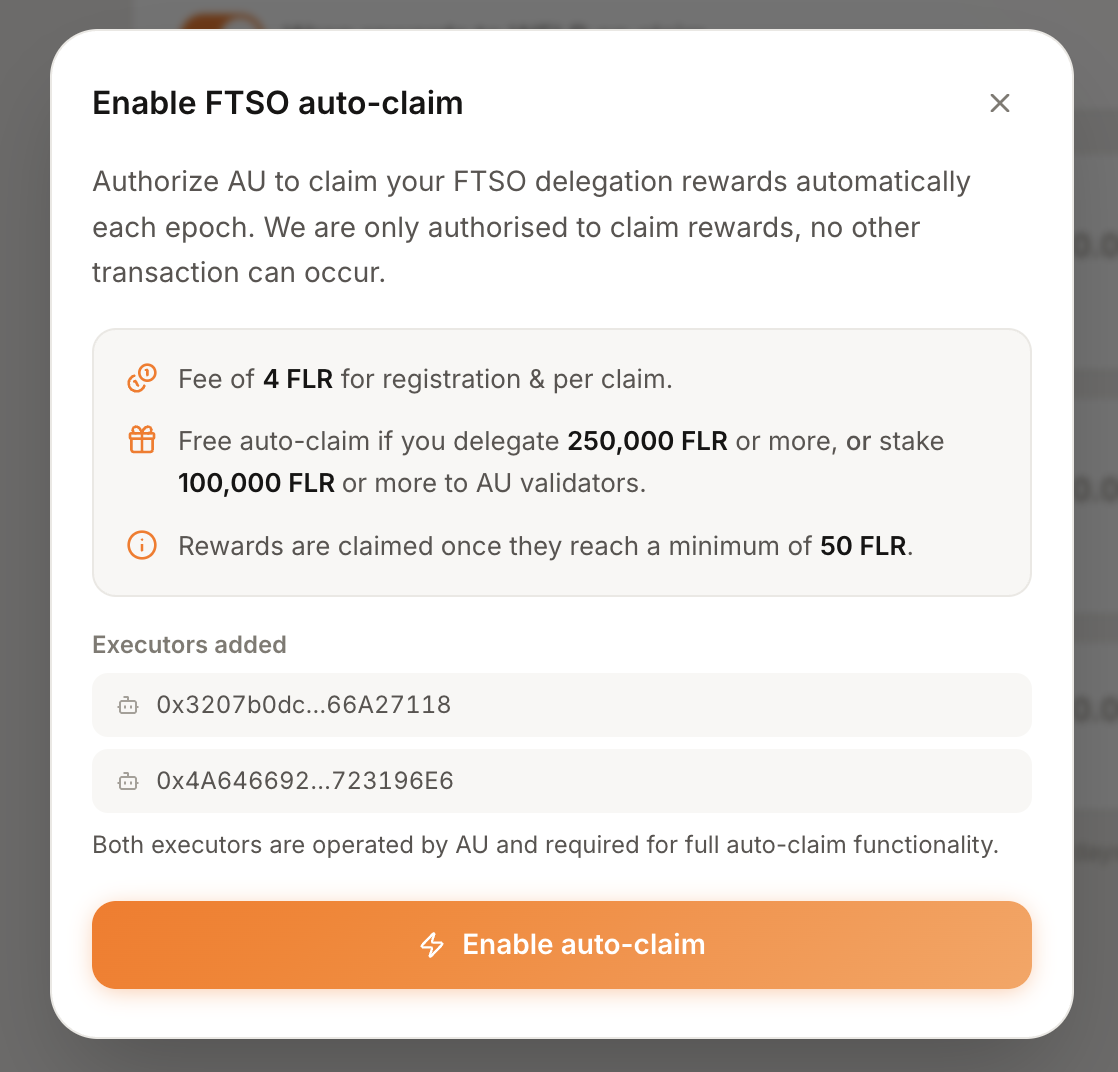 The auto-claim setup window. It lays out the fee, the free-auto-claim thresholds, and the two AU-operated executors that will be authorized.
That single transaction authorizes the AU executors on the appropriate registry for your account. Once it confirms, the reward card updates to show the "Auto-claim on" badge, and you're done - your rewards will now be claimed automatically each epoch.
A Note If You Already Have Other Executors
Registering executors on Flare replaces your entire executor list rather than adding to it. If you've previously set up executors elsewhere, the AU app will detect them and give you a choice:
- Keep existing & enable - adds AU's executors alongside your current ones (recommended).
- Replace all with AU executors - removes any previously set executors and uses only AU's.
Choosing to keep your existing executors is the safe default, so you don't accidentally disable another service you rely on.
Summary
- Auto-claim claims your Flare rewards for you every epoch, delivered straight to your own wallet.
- It's powered by Flare's native executor system - executors can only claim rewards, never move or touch your funds.
- AU runs its own executors and does the work (and pays the gas) of claiming on your behalf, claiming once rewards reach 50 FLR.
- The fee is 4 FLR per registration and per claim - but auto-claim is free if you delegate 250,000 FLR+ or stake 100,000 FLR+ to AU.
- Enabling it takes one transaction in the AU app.
Set it once and never miss a reward epoch again.